

Persistence
The Persistence dashboard shows which services in the fleet have the most N+1 queries and in-memory pagination.
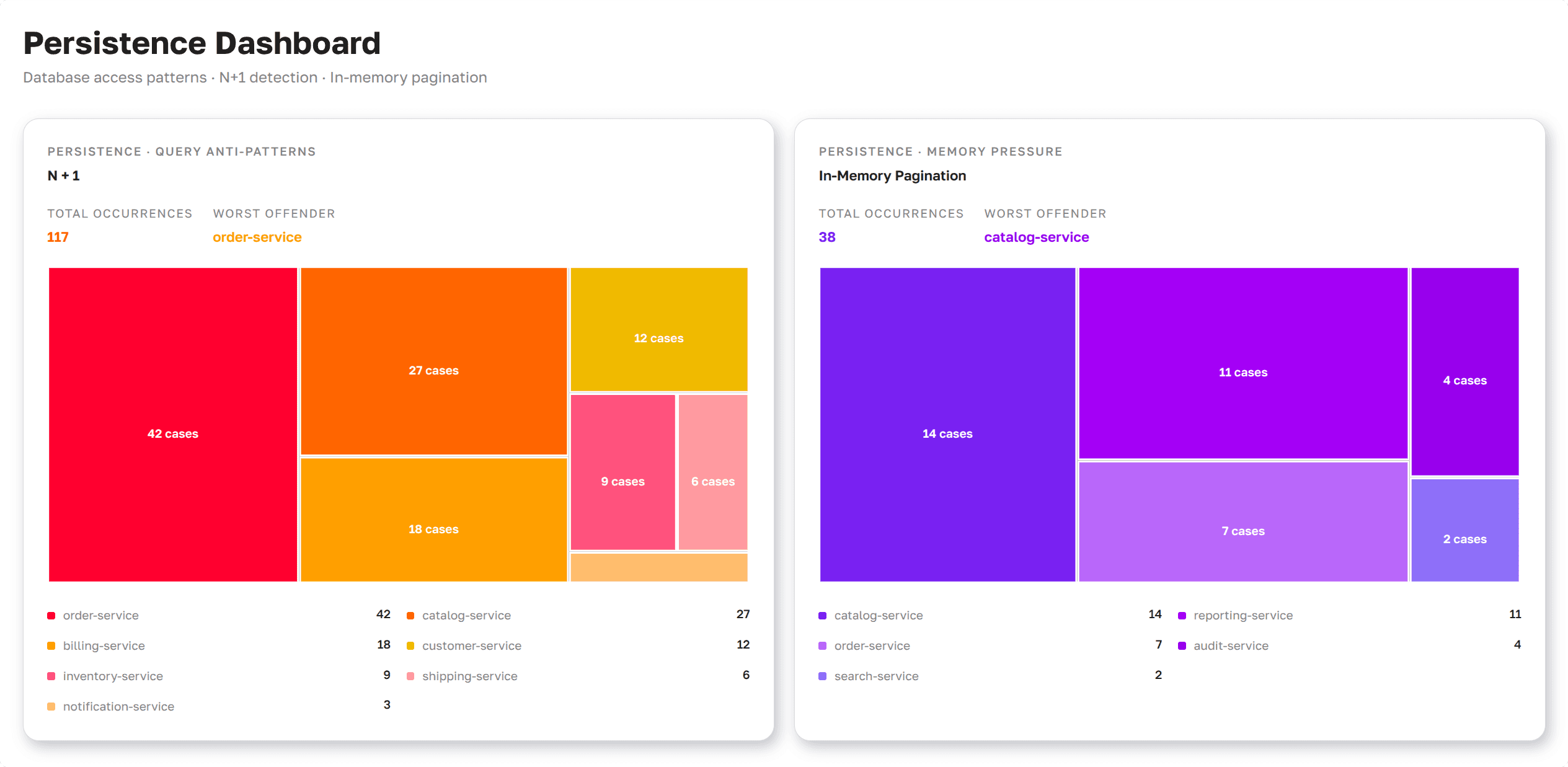
Persistence Dashboard as presented in Axelix UI
N+1 queries and in-memory pagination don't break the application, but they cost extra queries and memory. Transaction Control shows them for one service. The Persistence dashboard shows where in the fleet there are the most of them, so you can see which services to look at first.
The page is read-only and available to every authenticated user: VIEWER, EDITOR, ADMIN, and SUPER_ADMIN can all open it. See Roles and authorities for the full role/authority matrix.
What the page shows
The page shows two problems side by side:
- N+1: A lazy association is loaded with a separate query for each record.
- In-Memory Pagination: Hibernate loads the whole result set and cuts the page in memory.
For each problem, you can see:
- How many cases there are across the fleet.
- Which service has the most cases.
- How the cases are spread across services.
Services without cases are not shown. For details on each problem, see Detected problems in Transaction Control.
How it works
The dashboard counts what Transaction Control has found in each service. Master records it once a day and uses the latest record. A service counts once however many instances it runs.
The data appears only for services with Hibernate and transaction monitoring enabled. See Properties in Transaction Control.