

Troubleshooting
This page describes the most common issues that occur during Axelix installation and configuration.
1. Authentication Error (401) When Accessing Axelix Endpoints
Symptom
On the Master side, a 401 error is returned when communicating with the managed service, even though access to Axelix endpoints is enabled in application.yaml on the managed service side and Spring Security is configured correctly.
Most Likely Cause
In practice, the actuator endpoints exposed by the managed service (the microservice that includes the Axelix Spring Boot Starter and plugin) are almost never left open. It is very common — and generally recommended — to protect them with some authentication mechanism: HTTP Basic, an OIDC/OAuth2 resource server, or any other scheme wired into the application's Spring Security configuration.
At the same time, Axelix ships with its own Identity & Access Management (IAM). When the Master communicates with the managed service, it calls the custom Axelix actuator endpoints (those that start with /actuator/axelix-**, but note that the actuator prefix may be different - it is configurable) and attaches its own Axelix-issued bearer token in the Authorization header. This token is meant to be understood by the Axelix components on the managed service, not by the managed service's own security stack.
Custom actuator prefix
The /actuator part is the actuator base path, which is configurable via management.endpoints.web.base-path (it defaults to /actuator). If your managed service overrides this property, the Axelix endpoints live under the configured base path instead — for example, a base path of /manage means the endpoints are reachable at /manage/axelix-**. Keep this in mind for the request matcher in the solution below.
The 401 arises from the collision between these two independent authentication systems: the managed service's security filter intercepts the request before it ever reaches the Axelix components, sees a bearer token, and tries to validate it against the managed service's own IAM — where the Axelix token is unknown and therefore rejected.
The Solution:
The solution is to exclude Axelix custom actuator endpoints (i.e. those that are prefixed with /actuator/axelix-**, again, considering the ability to configure the custom prefix for actuator endpoints) from the application IAM and trust Axelix's own IAM:
@Bean
public WebSecurityCustomizer webSecurityCustomizer() {
  return (web) -> web.ignoring().requestMatchers("/actuator/axelix-**");
}
2. Wrong Starter Module for Your Spring Boot Version
Symptom
The application fails to start right after you add an Axelix Spring Boot Starter dependency, with a
NoClassDefFoundError or ClassNotFoundException naming a javax.servlet.* or jakarta.servlet.* class - for
example javax/servlet/FilterChain in a Spring Boot 4.x project, or jakarta/servlet/FilterChain in a Spring Boot
2.x project.
Most Likely Cause
Axelix ships a separate starter artifact per Spring Boot major version:
axelix-spring-boot-2-starterfor Spring Boot 2axelix-spring-boot-3-starterfor Spring Boot 3axelix-spring-boot-4-starterfor Spring Boot 4
These are different Maven Artifacts, shipped separately (although they all follow the same versioning scheme). So, when adding the Spring Boot starter, you need to make sure to add the starter for your appropriate major version of the Spring Boot.
The Solution:
Match the starter to your application's Spring Boot major version - see A dedicated starter per Spring Boot major version and the exact coordinates in Configuring Spring Boot Starter.
3. A Locally Started Service Doesn't Register With a Locally started Master
Symptom
You run Axelix Master locally, add the starter to your own service, and launched that service from within the IDE. It starts without errors, but never shows up in Master - no error on either side, no entry in the sidebar.
Most Likely Cause
Two prerequisites are missing, and both are easy to skip when the IDE's default "Run" button just compiles and launches the main class.
The build plugin never ran. Axelix has the build plugins for Maven & Gradle.
These plugins stamp META-INF/axelix-info.properties (that contain service's groupId/artifactId/
version) into the build output, and the starter needs that file to identify the service to Master.
And in case of Maven, e.g. the goal that does the job (i.e. axelix-generate-project-info) is bound to the prepare-package
phase - a plain "compile and run" in the IDE never reaches it. The Gradle task is wired into processResources specifically
so IDE runs pick it up too, but that only happens if the IDE actually invokes that task, which requires delegating build/run
actions to Gradle rather than using the IDE's own incremental compiler.
Master can't find the instance on its own. Master's Kubernetes-based autodiscovery has nothing to scan on a local machine, so the service must self-register instead.
The Solution:
Run a real build at least once before relying on the IDE's Run button - mvn package (or mvn install), or
./gradlew build. See What is the Axelix build
plugin? for what the plugin generates and
why it's required.
Then point the starter at your local Master with self-registration, and match the JWT signing key on both sides - the same value goes on Master and on every instance, since this is a symmetric HMAC algorithm:
server.port=9444
axelix.sbs.auth.jwt.algorithm=HMAC256
axelix.sbs.auth.jwt.signing-key=8DrZJSOJ8vkbxdjUB3sSsyeiG4Xidf1sDNmJq1Slkkn
axelix.sbs.discovery.self-registration=true
axelix.sbs.discovery.instance-name=your-application-name
axelix.sbs.discovery.instance-actuator-url=http://localhost:9444/actuator
axelix.sbs.discovery.master-url=http://localhost:8080/api/internal/service/register
On Axelix versions below 1.2.0 (exclusive), one more property is required — older starters do not expose their
endpoints themselves, and without axelix-metadata Master cannot probe the instance:
management.endpoints.web.exposure.include=axelix-metadataFinally, start Master itself as a JAR with the same algorithm and signing key:
java \
  -Daxelix.master.auth.jwt.algorithm=HMAC256 \
  -Daxelix.master.auth.jwt.signing-key=8DrZJSOJ8vkbxdjUB3sSsyeiG4Xidf1sDNmJq1Slkkn \
  -jar master.jar
A mismatched key rejects the heartbeat with 401 instead of registering it. See Configuring Spring Boot
Starter for
the full self-registration reference and Run as a
JAR for the Master side.
Never reuse the signing key above, or any example key from this page, in a real deployment.
4. Some Sidebar Sections Stay Empty After Registration
If you are on Axelix 1.2.0 or later, none of this is required: the starter registers its custom actuator endpoints by itself, and Axelix no longer requires the health/info endpoints to be enabled — it works perfectly well without them. No configuration is needed here.
Symptom
The instance appears in Master and its status looks healthy, but some sidebar sections - Beans, Caches, Loggers, and similar - stay empty or fail to load.
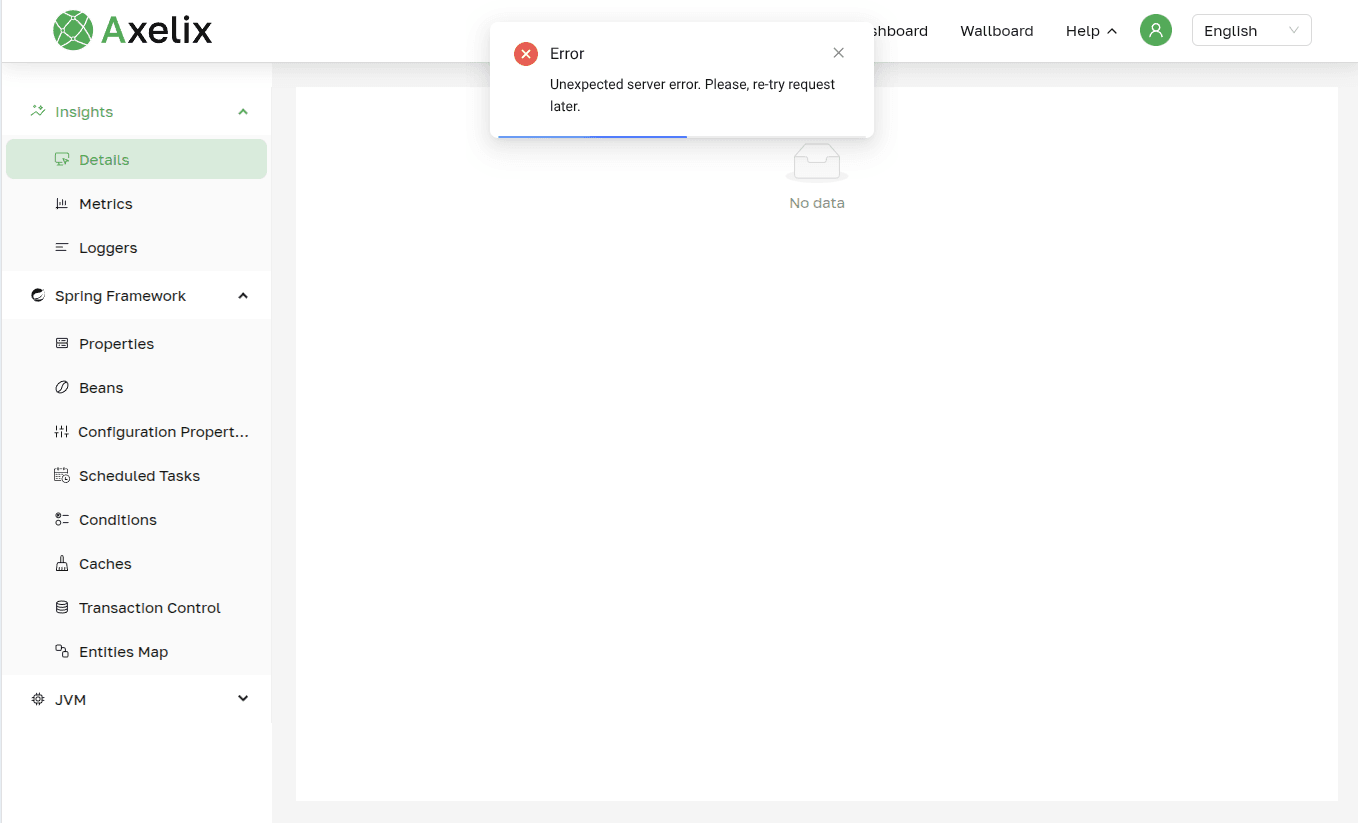 A sidebar section (Details) selected but showing "No data" and an "Unexpected server error" toast instead of the actual data
Most Likely Cause
Spring Boot hides custom actuator endpoints from web exposure by default, and each Axelix UI section reads its own
dedicated endpoint (axelix-beans, axelix-caches, axelix-loggers, and so on). Only axelix-metadata is required
for the instance to appear in Master at all - every other endpoint is opt-in, so a section with no matching endpoint
in management.endpoints.web.exposure.include simply has nothing to read from.
The Solution:
Add the missing endpoint IDs to management.endpoints.web.exposure.include on the managed service - see What the starter
exposes
for the full list.