

Upgrading Axelix
The procedure that makes upgrading a real fleet safe and predictable when Master and the starters move at different speeds.
Axelix is released in lockstep — every release publishes all components under one version. But a real fleet never upgrades in lockstep: the platform team upgrades Axelix Master in one go, while dozens of services carry the starter and the build plugin as ordinary dependencies and bump them whenever their teams get to it. This page describes the procedure that makes that reality safe and predictable.
Since Axelix 1.1
The upgrade policy outlined below was introduced in Axelix 1.1 and applies to that release and everything above. Note, that this upgrade policy covers the upgrades of minor releases within a single Axelix major. Each major version migration has the dedicated migration guide.
The compatibility window
The whole procedure rests on one guarantee:
Axelix Master supports starters from the last 4 minor releases, counting its own.
For example, Master 1.4.x supports services running starters 1.1.x through 1.4.x. A service on starter 1.0.x
is outside the window of Master 1.4.x and is no longer guaranteed to work with it:
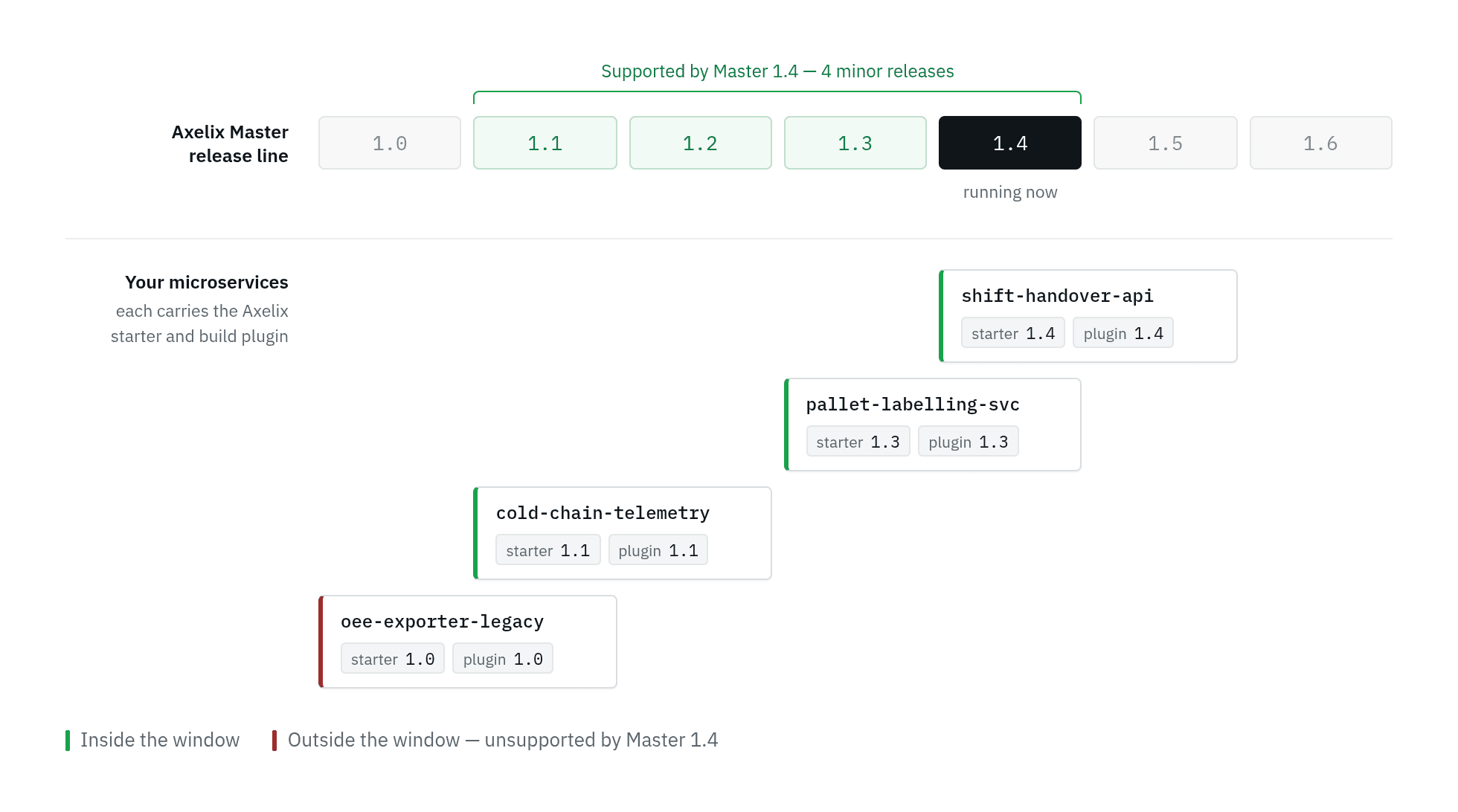 Master
 1.4 supports services whose
starter falls within the 1.1–1.4 window. The service still on starter 1.0 is outside the window and is no
longer supported.
This is a guaranteed minimum: we may support a wider range in practice, but we promise at least these 4 minors, and we will not narrow the window within a major version.
Two rules follow from the window:
- Master goes first. The window points backwards: a newer Master supports older starters, never the other way around. Do not run a starter whose version is newer than your Master.
- Starter and plugin move together. Within a single service, the starter and the build plugin must share the same
major.minorversion — bump them in the same change. The window applies between Master and your services, not inside a service.
The upgrade procedure
1. Find out how far you can upgrade
Open Administration → Upgrading in the Master UI. It shows the highest Master version you can upgrade to without pushing any service out of the compatibility window — computed from the oldest starter version Master has observed across your fleet.
Because the window is pure arithmetic, Master computes this verdict entirely locally: no calls to any release page, no internet access needed. It works the same in air-gapped environments.
The page also lists the services that hold the verdict back — the ones running the oldest starters — so you know exactly which teams to nudge if you want to upgrade further.
2. Upgrade Axelix Master
Upgrade Master on every environment — dev first, then staging, then production. Master is a standalone deployment (JAR, Docker image, or Helm chart), so this step is entirely in the platform team's hands and touches no service. The mechanics of this step — stopping, backing up, rolling forward, and rolling back — are described in Upgrading Axelix Master itself below.
Your services keep working throughout: they are inside the window, that is the whole point of step 1.
3. Let the teams bump their services
Now hand the task down to the service teams: bump the starter and the plugin to the new version — both to the same version, in the same change — and redeploy. For a typical service this is a dependency version bump and nothing else.
This is not an accident but a deliberate design rule we follow: Axelix Master is the smart side, and the client-side components — the starter and the plugin — are kept as dumb as possible. All the interpretation and the heavy logic live in Master; the client components merely collect and ship raw data. That is what keeps a service upgrade quick and simple - ideally, we try to have very few configuration options in Axelix client components.
Teams do this independently and at their own pace. The window is their time budget: with 4 minors guaranteed, a service can skip a couple of Master upgrades before it must catch up.
4. Watch the fleet catch up
The Upgrading page shows the distribution of starter versions across the fleet. After a Master upgrade, watch it shift toward the new version — and see at a glance which services lag behind, including services created from stale templates that ship an old starter version.
Upgrading Axelix Master itself
Master upgrades are forward-only: you only ever move to a newer version, and there is deliberately no downgrade procedure. This is the standard model for stateful control planes, and the reason is the database. Master owns one, schema migrations apply to it automatically on startup, and we design those migrations to be simple, not reversible — a migration that reshapes a table can usually be undone only by throwing data away. So instead of pretending downgrades work, we invest in a reliable way back: a database backup taken during the upgrade, restored if things go wrong.
Forward-only does not mean one minor at a time. Upgrading from any older version to any newer version within
one major is supported in a single hop — going from 1.1 straight to 1.4 is fine. On startup the new Master
finds every migration your database has not seen yet and applies the whole chain in order; whether that chain spans
one minor or three makes no difference. The only exception is crossing a major version boundary: each major
release ships its own dedicated migration guide — follow that instead of this procedure.
One more thing to know before the steps: this is a stop-the-world procedure. It begins with stopping the running Master, so there is a short downtime window — typically a few minutes — during which the Master UI and API are unavailable. Your services, however, never notice it.
What happens to your services during the downtime
Nothing — by design. The starter inside each service reports to Master periodically, as a heartbeat, not once at startup. While Master is down, heartbeats simply go unanswered: the service keeps serving its own traffic, buffers nothing, and retries on its normal schedule. Once the new Master is up, the very next heartbeat of every service re-registers it from scratch, so the whole fleet reassembles itself within one heartbeat interval. That is why the steps below never mention your services: no coordination with service teams, no draining, and no restarts are needed — from a service's point of view a Master upgrade is indistinguishable from a brief network hiccup.
Step by step
-
Stop the running Master. However your installation runs it — a Kubernetes Deployment, a container, a plain JAR — bring it fully down. This is where the downtime window opens.
-
Back up the database. Use the regular tooling of your engine: a dump for PostgreSQL or MySQL, a copy of the database file for SQLite. Take the backup after stopping Master — with nothing writing to the database, the snapshot is guaranteed to be consistent. Do not skip this step even for a routine-looking upgrade: this backup is the rollback procedure.
-
Start the new Master version. On startup it applies all pending database migrations automatically and then starts serving traffic. Give it time to finish — do not restart or kill Master while migrations are being applied.
-
Verify. The UI is reachable and reports the new version, and within one heartbeat interval your services reappear on their own. If the fleet looks complete, services have re-registered themselves successfully, then you can assume the Axelix Master upgrade is done.
Rolling back
If for any reason the new version misbehaves, the way back is the backup from step 2:
- Stop the new Master.
- Restore the database from the backup.
- Start the version you upgraded from.
Everything written to the database between the backup and the rollback is lost — and for Master that loss is negligible, by design.
The service registry is self-healing: it rebuilds from heartbeats within one interval. What does not self-heal — users, roles, settings — rarely changes inside a window that short. Do remember that a rollback is a stopgap, not a destination: forward-only means the long-term path always leads upwards, so if an upgrade failed for you, please open an issue — the actual fix will arrive as a newer version.
Invariants
-
Never run two different Master versions against the same database at the same time. The new version reshapes the schema the moment it starts, and the old version is not built to survive that reshaping — keeping old code compatible with future schemas is precisely the complexity forward-only lets us avoid. On Kubernetes this means the Master Deployment must use the
Recreatestrategy: the defaultRollingUpdatebriefly runs the old and the new pod side by side — even with a single replica — and that overlap lands exactly on the moment migrations are being applied. -
A short Master downtime is expected. We deliberately do not promise zero-downtime Master upgrades: that would require reversible, multi-phase migrations and a highly-available Master, and we prefer to keep both the product and this procedure simple. Only the Master UI and API are down during the window; your services keep running untouched.
-
One Master replica at a time. Master is currently designed as a single-instance application: its background jobs — discovery polling, evicting dead instances — and its in-memory caches all assume exactly one Master is running. Several replicas would duplicate that work and race with each other. A highly-available, multi-replica Master is on the roadmap.
Services that fall behind
A Master upgrade is never blocked by lagging services — the decision always stays with the platform team. The trade-off is stated upfront: before you upgrade, the Upgrading page lists exactly which services would fall out of the compatibility window if you went past the safe verdict — so you know precisely what an upgrade costs and whom to talk to.
Be aware of what that cost is: a service whose starter is outside the window is no longer supported at all. It will disappear from the Master UI and stay invisible until its starter is upgraded back into the window. The warning happens before the upgrade, not after — once you have upgraded past a service, nothing in the UI will remind you it exists.
Major version upgrades
The compatibility window is defined within a major version. Every major release ships with a dedicated migration guide that spells out the upgrade path from the previous major — including which final minors of the previous major the new Master can still talk to during the transition.