

Dependency Health
The Dependency Health dashboard shows every library the applications in the fleet use, how their versions spread, and which of them have left active development.
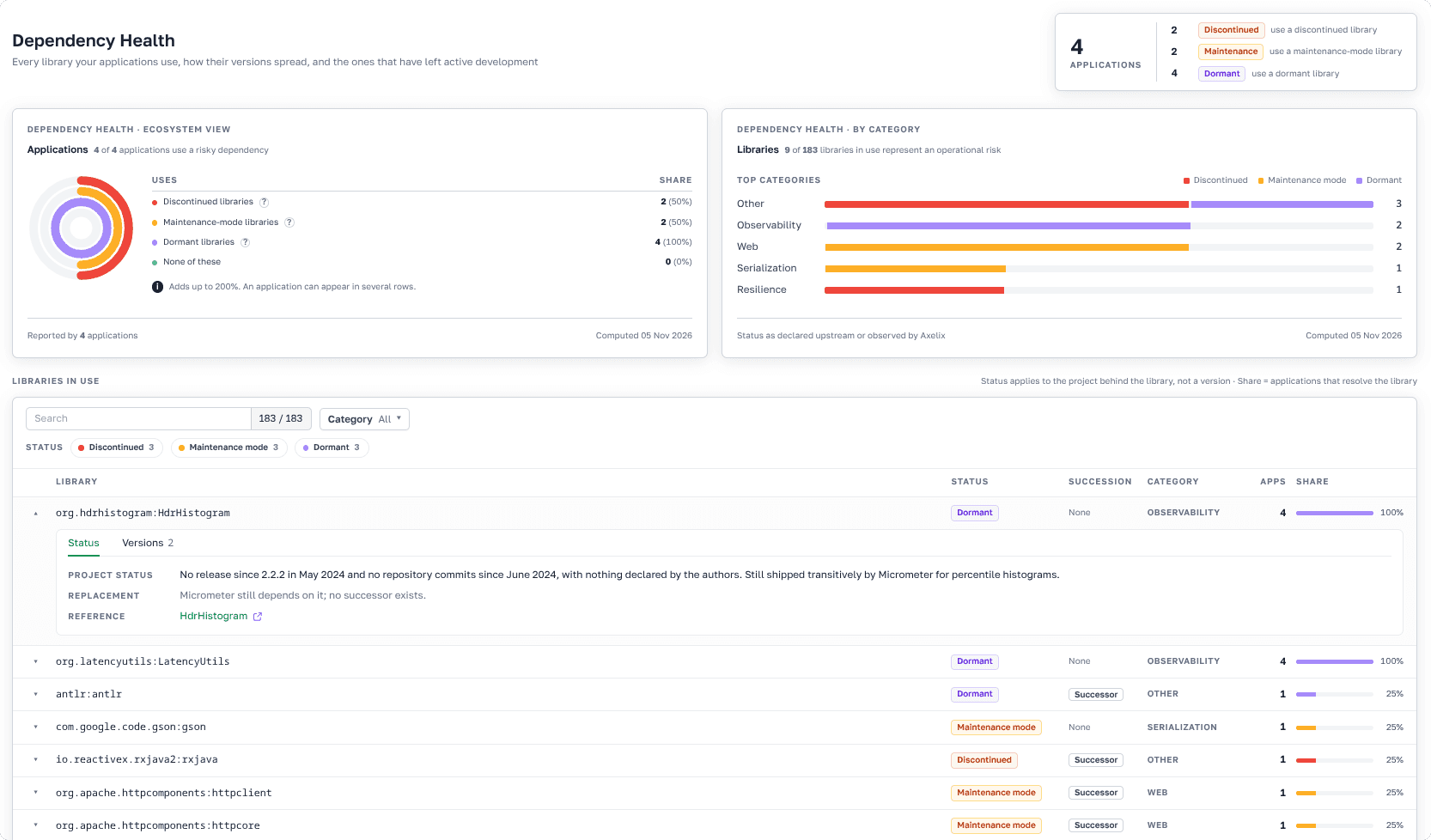
Dependency Health as presented in Axelix UI
Dependency Health shows the status of the libraries your applications use: which of them have left active development, which only get critical fixes, and which probably get no fixes at all. This way, you know in advance where you probably won't get a patch if a CVE comes out tomorrow. The page doesn't look for vulnerabilities or change anything in your applications. Its job is to make you aware of this risk before it becomes a problem.
The page is read-only and available to every authenticated user: VIEWER, EDITOR, ADMIN, and SUPER_ADMIN can all open it. See Roles and authorities for the full role/authority matrix.
What the page shows
A summary on top shows how many applications reported their dependencies, and how many of them use a library in each risky status:
- Discontinued: The project has announced the end of development or archived its repository. No further releases are planned, security fixes included.
- Maintenance mode: The project has declared that it only ships critical bug and security fixes. It adds no new features, and a successor is usually recommended.
- Dormant: No releases for an extended period, and the project has declared no maintenance or end-of-life status. It may still work, but no one is known to be fixing it.
Below, the page looks at the same risk from two sides. The first one is applications: how many of them use a risky dependency, what share of the fleet falls under each status, and how many use None of these. An application appears under every status it has, so one that uses both a discontinued and a dormant library counts twice. Because of this, the percentages can add up to more than 100%.
The second one is libraries: how many of the libraries in use are risky, and which categories hold the most of them, for example Persistence, Logging, or Security. The page charts the five categories with the most risky libraries.
Finding a library
The list of libraries starts with the risky ones, and within each group the most widely used come first, so the problems that affect the most applications are at the top. For each library, you can see:
- Its status, if the status is risky.
- Whether the project has a successor, if the status is risky.
- Its category.
- How many applications use it, and what share of the fleet that is.
You can narrow the list by category and status. For example, select Discontinued and the Security category to see which security libraries no longer get fixes. Clicking a category in the chart applies the same category filter to the list.
A library without a status in the list is either actively developed or unknown to Axelix, see How it works. Libraries unknown to Axelix have no category or status, so any category or status filter hides them.
Library details
Expand a library to decide what to do about it. For a risky library, you can see:
- A summary of the project's status.
- The project that supersedes it or the recommended replacement, if there is one.
- A link to the upstream page that backs the status.
For any library, you can also see which versions the fleet uses, from newest to oldest, how many applications run each version, and what share of the library's applications that is. It shows how far behind the fleet is, even for a healthy library, and how many applications an upgrade would touch.
How it works
At build time, the Axelix build plugin writes the application's runtime dependency graph into the application archive as a CycloneDX SBOM. The application reports this SBOM to Master once, when it registers. A later report from the same application replaces the previous one, so the page reflects the build that registered last. When you open the page, Master computes the numbers from the stored reports.
An application counts once however many instances it runs. An application that stopped reporting stays on the page with the dependencies it last reported.
Only applications on the Axelix starter 1.3.0 or later report their dependencies at registration, so applications on older versions are not counted. When no application has reported them, the page says that there is no data to show. To upgrade, see Upgrading Axelix.
Master matches the libraries against its catalog of projects. The status belongs to the project behind the library, not to a specific version, so upgrading a discontinued library to its latest version doesn't change its status. A library whose project is not in the catalog, such as your organization's internal library, still counts towards the total number of libraries. This means Axelix makes no claim about it, not that the project is healthy.