

Dependencies Analyzer
The Dependencies Analyzer shows every library a Spring Boot instance runs with, flags the projects that are no longer actively developed, and shows whether the instance's Spring Boot line still receives OSS updates.
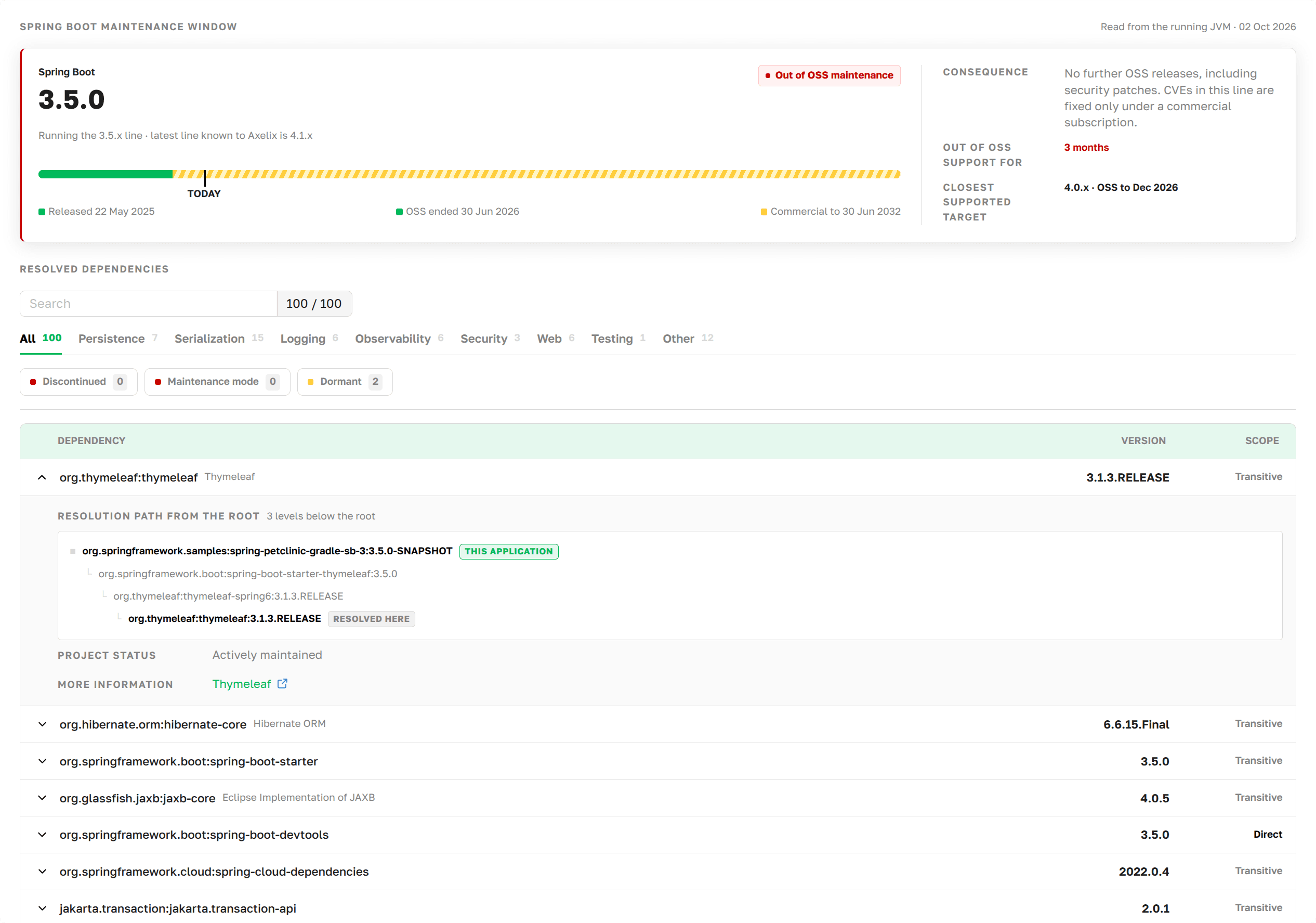
Dependencies Analyzer as presented in Axelix UI
An application pulls in dozens of libraries, most of them transitively. The build file doesn't tell you which of them
are abandoned or in maintenance mode and will get no more security fixes. It also doesn't tell you whether the Spring
Boot line (a minor version branch such as 3.5.x) the application runs on still receives OSS updates. The Dependencies Analyzer shows both for a specific
instance.
The page is read-only and available to every authenticated user: VIEWER, EDITOR, ADMIN, and SUPER_ADMIN can all open it. See Roles and authorities for the full role/authority matrix.
What the page shows
The Spring Boot support window comes first. It shows which Spring Boot line the instance runs on, when OSS support for this line ends or ended, whether commercial support is available, how long the line has been out of OSS support, and the closest line that is still supported. Once OSS support ends, the line gets no more OSS releases, security patches included: CVEs are fixed only under a commercial subscription.
Below, the page lists every library on the runtime classpath with its version, and whether it is declared directly in the build file or pulled in transitively. Projects that are no longer actively developed are flagged:
- Maintenance mode: Feature development has stopped, and releases happen only for critical fixes.
- Dormant: No releases for a long time, but the authors have announced nothing. Unlike the other statuses, this is what Axelix observes, not what the authors said.
- Discontinued: The project is finished. No releases of any kind are expected, security fixes included.
Expand a library to see:
- The path from the application to this library, that is, which direct dependency pulled it in.
- The status of its project.
- A link to the upstream page that backs the status.
How it works
At build time, the Axelix build plugin writes the application's runtime dependency graph into the application archive as a CycloneDX SBOM. The Axelix Spring Boot Starter serves this file to Master. When you open the page, Master matches the libraries against its catalog of projects and its data on Spring Boot release lines.
A library whose project is not in the catalog is shown without a status. This means Axelix makes no claim about it, not that the project is healthy.
The page needs the Axelix starter and build plugin 1.2.0 or later. For instances on older versions, the page is not shown in the Service Profile sidebar. To upgrade them, see Upgrading Axelix.