

Properties
The Properties page lists every property the Spring Boot instance resolves at runtime, grouped by the property source that contributed it. For each property, it shows the value, marks the source that currently wins the resolution, and — where Spring binds the property — links out to the @ConfigurationProperties bean and to the injection points that read it.
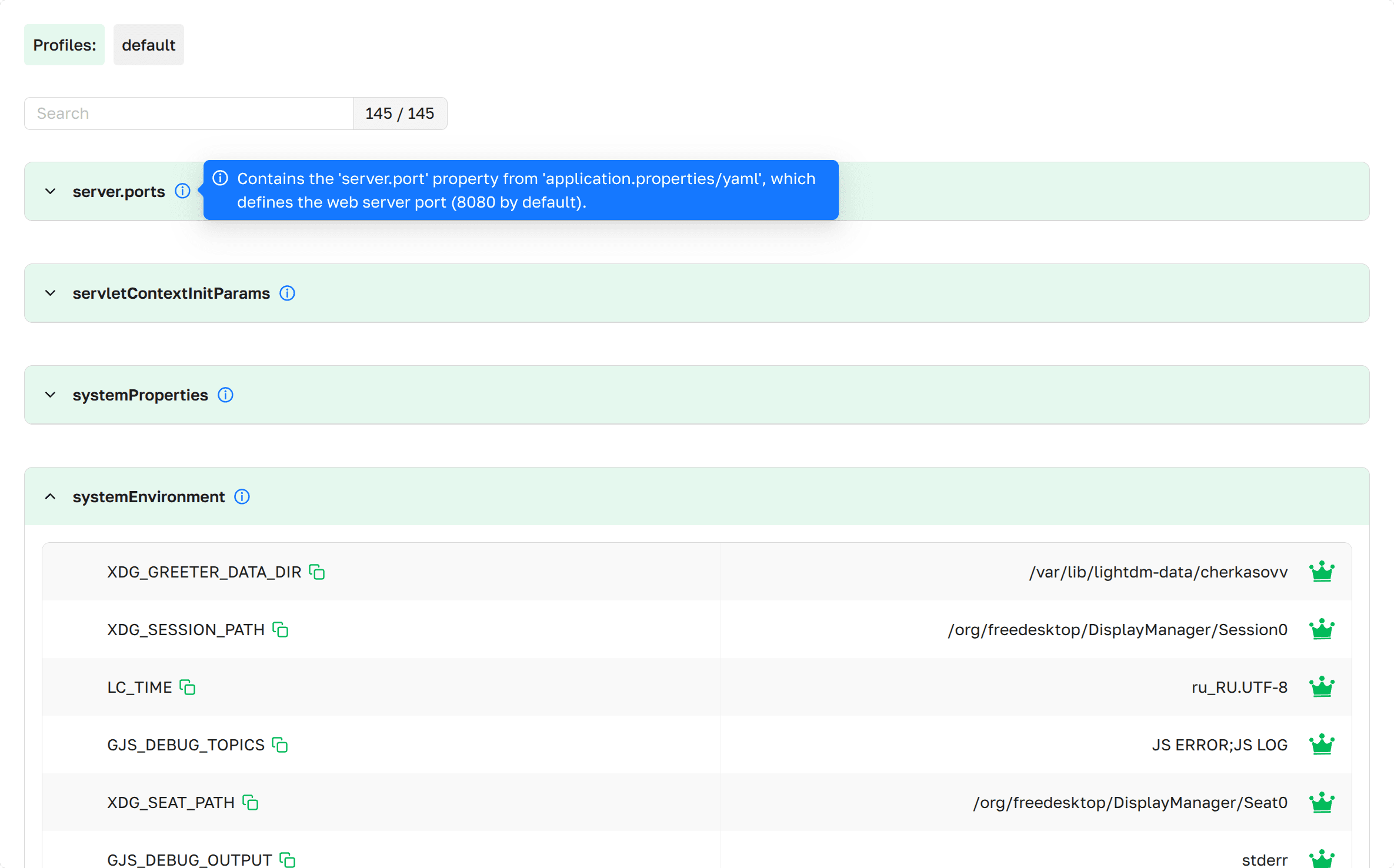 Properties as presented in
Axelix UI
Properties as presented in
Axelix UI
If the instance has any active or default Spring profiles, they appear on top of the page under Profiles: — the
chips combine spring.profiles.default and spring.profiles.active. The block is hidden when no profile is set.
Below the profiles, a scrollable list of all properties, grouped by their property source. Each source is an expandable
section (expanded by default), with a search input above the list that filters property sources and entries, and a
counter in the form <matching> / <total>.
- Source Name: The name of the property source.
- Description: Hover the icon
 next to the source name
to see the custom description of this property source, when the source provides one.
next to the source name
to see the custom description of this property source, when the source provides one. - Properties: The list of property entries within the source.
Properties Details
 Properties dropdown as
presented in Axelix UI
Properties dropdown as
presented in Axelix UI
Each property row shows the property name, a copy-to-clipboard control, the resolved value, and a primary-source marker. Expanding a row reveals the details panel:
- Name: The property name.
- Value: The value resolved from this property source.
- Primary value: Marked with the crown icon
 in the value column. The crown means this value wins resolution —
when the same key exists in multiple property sources, only the source consulted first by the Spring environment is
marked primary.
in the value column. The crown means this value wins resolution —
when the same key exists in multiple property sources, only the source consulted first by the Spring environment is
marked primary. - Deprecated: Deprecated properties are highlighted with a red background on the row header, and the details panel shows the deprecation message.
- Description: The description from
spring-configuration-metadata.json, when available. - Configuration Properties: The
@ConfigurationPropertiesbean that binds this property, if any. The bean name is a link that jumps to the Configuration Properties
page anchored at that bean.
that jumps to the Configuration Properties
page anchored at that bean. - Injected in: Beans that consume this property through
@Valueor similar. Each entry is a link that jumps to the Beans page anchored at that
bean.
By default, every value is masked as ****** for callers that do not carry the ENV_VALUES_READ authority. See Value
sanitization below for how to choose which keys are masked and who sees the originals.
Value sanitization
Axelix never relies on the Spring Boot management.endpoint.env.show-values switch — it always asks Spring Boot to
return raw values (Show.ALWAYS) and applies its own masking on top, driven by an authority check.
Who sees raw values. Callers carrying the ENV_VALUES_READ authority — granted by the built-in ADMIN and
SUPER_ADMIN roles — receive the originals. Everyone else gets values replaced with ******. See Roles and
authorities for the full
role/authority matrix.
Which keys are masked. A single starter property — axelix.sbs.endpoints.config.sanitized-properties — controls the
set, and it applies to both axelix-env (this page) and axelix-configprops (the Configuration
Properties page):
- Empty list (default) — every value is masked for callers without the authority.
- Non-empty list — only the listed keys are masked, the rest are returned as-is.
axelix.sbs.endpoints.config.sanitized-properties[0]=database.password
axelix.sbs.endpoints.config.sanitized-properties[1]=spring.datasource.password
axelix.sbs.endpoints.config.sanitized-properties[2]=jwt.signing-key
See Sanitize sensitive property values in the Spring Boot Starter configuration guide for the same property described alongside the rest of the starter setup.
The standard Spring Boot Actuator properties for masking — management.endpoint.env.show-values,
management.endpoint.env.keys-to-sanitize, and their configprops equivalents — are not consulted. Use
axelix.sbs.endpoints.config.sanitized-properties instead.
MCP Tools
The full environment of a managed instance — application properties, system properties, and OS environment variables — is also exposed to AI agents through MCP. See the MCP Tools catalog.
Enable Dedicated Actuator Endpoint
If you are on Axelix 1.2.0 or later, none of this is required: the starter registers its custom actuator endpoints by itself, and Axelix no longer requires the health/info endpoints to be enabled — it works perfectly well without them. No configuration is needed here.
The page is backed by the axelix-env actuator endpoint contributed by the Axelix Spring Boot Starter. Expose it
through the standard Spring Boot Actuator properties — see Configuring Spring Boot
Starter for the full list
of Axelix endpoints and surrounding setup:
management.endpoints.web.exposure.include=axelix-env