

Loggers
The Loggers page provides access to all configured logging mechanisms in a Spring Boot application, logger groups, and allows changing their logging levels.
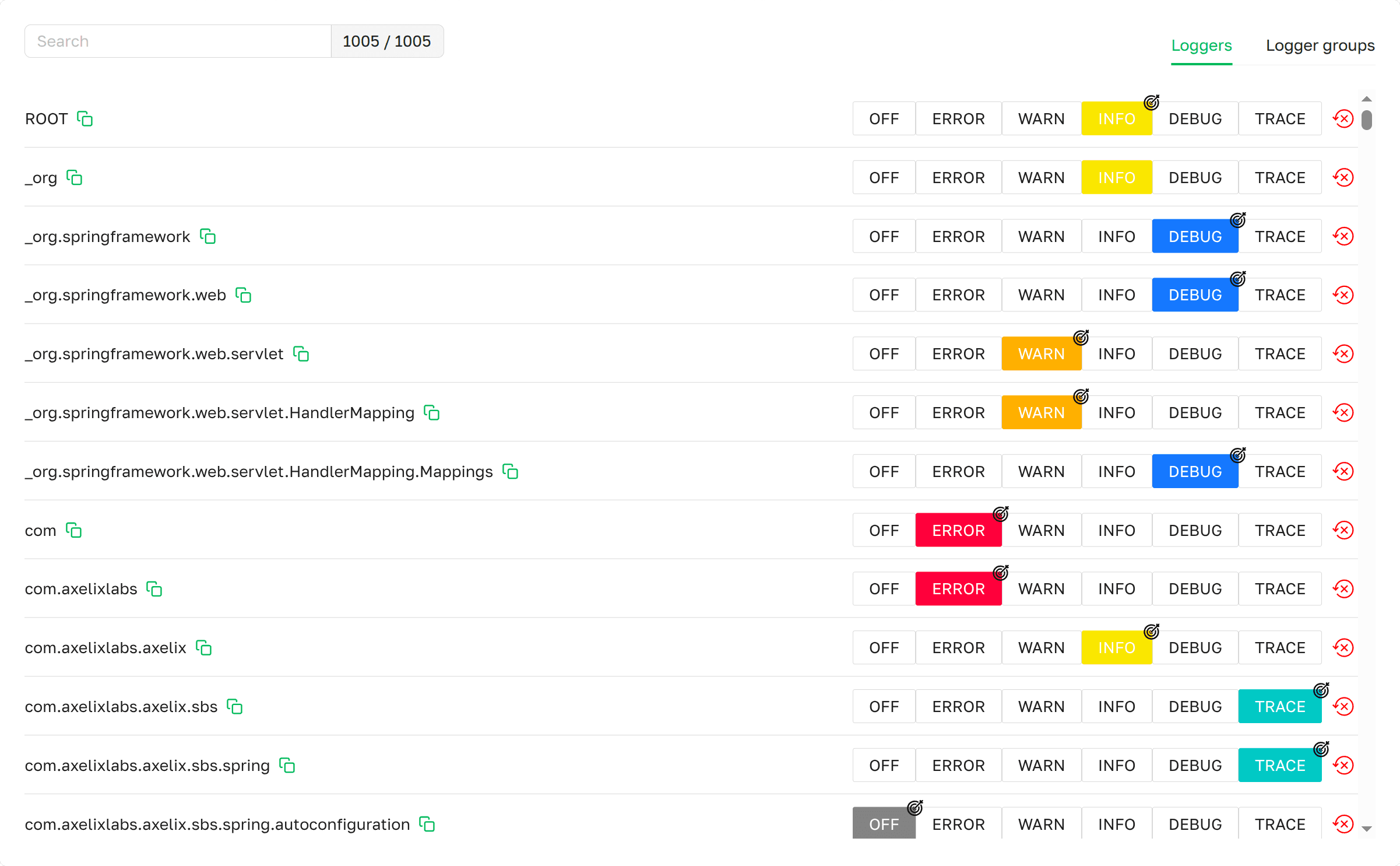 Loggers page as presented in Axelix
UI
Loggers page as presented in Axelix
UI
The page is available to every authenticated user — VIEWER, EDITOR, ADMIN, and SUPER_ADMIN can all open it, change levels, and reset levels. See Roles and authorities for the full role/authority matrix.
Loggers tab
A scrollable list displaying all active loggers in the application, with an indicator of their logging levels, a search
function for easy navigation, and a counter of active loggers in the form <matching> / <total>.
- Name: The name of the logger.
- Logging level: The logger's current level. (See Interactive Features)
- Reset: Resets the logging level to its initial value. (See Interactive Features)
Logger groups tab
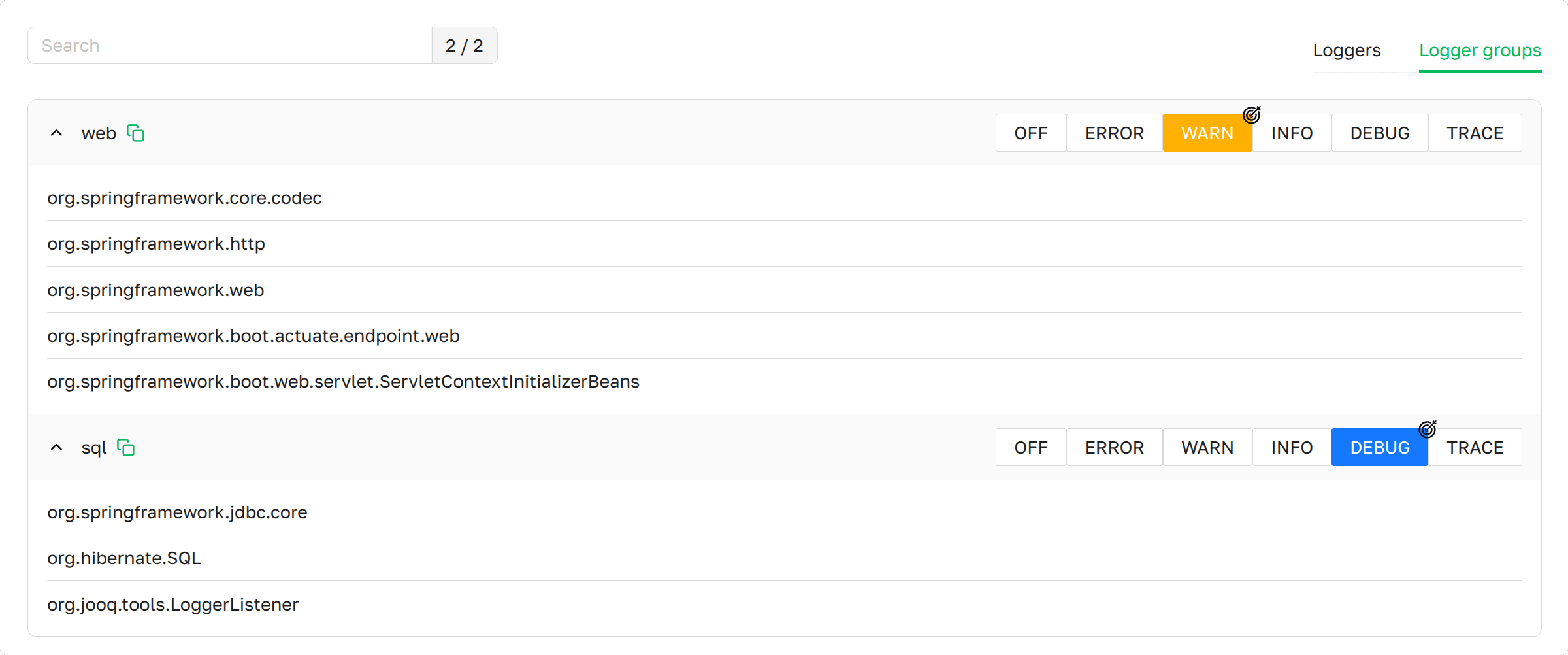 Loggers group page as
presented in Axelix UI
Loggers group page as
presented in Axelix UI
A scrollable list displaying all logger groups, with an indicator of their logging levels, a search function for groups and loggers for easy navigation, and a counter of groups.
- Name: The name of the logger group.
- Logging group level: The current logging level of the logger group. If no level is highlighted by a color indicator, the loggers within the group have different logging levels. (See Interactive Features)
Interactive Features
We provide the ability to change the logging level of an individual logger as well as a logger group.
Loggers
For example, the logger com.axelixlabs.axelix.sbs has a logging level of INFO (starting point). To change its
level, click on the desired level, for example WARN. The logger will update, and the selected level will be marked
with an icon  . Note that when changing the logging level of
 com.axelixlabs.axelix from INFO to
DEBUG (step 2), it will also be marked with an icon , and all loggers with the prefix
com.axelixlabs.axelix will change their level to DEBUG (step 2). However, they will not be marked with an icon
, because their level matches the parent logger com.axelixlabs.axelix.
 . Note that when changing the logging level of
 | Logger name | Starting point | Step 1 | Step 2 |
|---|---|---|---|
| com.axelixlabs.axelix |  | |  |
| com.axelixlabs.axelix.sbs | |  |  |
| com.axelixlabs.axelix.sbs.autoconfiguration.spring | | | |
We also provide the ability to reset the logging level for a specific logger:
- Initially, the
com.axelixlabs.axelix.sbslogger had the TRACE level (starting point). - It was then changed to the INFO logging level (step 1).
- Using the Reset button, you can restore the logger to its original TRACE level (step 2).
| Logger name | Starting point | Step 1 | Step 2 |
|---|---|---|---|
| com.axelixlabs.axelix | | | |
| com.axelixlabs.axelix.sbs |  |  | |
Logger groups
- If the loggers in a group have different levels, the group has no color indicator on the level row.
- Changing the level of, for example, the
webgroup to WARN applies WARN to every logger in that group. - Resetting the level of a logger group is not supported — only individual loggers can be reset.
MCP Tools
Reading the logger tree and changing levels at runtime — for a single logger, a logger group, or resetting an individual logger — are also exposed to AI agents through MCP. See the MCP Tools catalog.
Enable Dedicated Actuator Endpoint
If you are on Axelix 1.2.0 or later, none of this is required: the starter registers its custom actuator endpoints by itself, and Axelix no longer requires the health/info endpoints to be enabled — it works perfectly well without them. No configuration is needed here.
The page is backed by the axelix-loggers actuator endpoint contributed by the Axelix Spring Boot Starter. Expose it
through the standard Spring Boot Actuator properties — see Configuring Spring Boot
Starter for the full
list of Axelix endpoints and surrounding setup:
management.endpoints.web.exposure.include=axelix-loggers