
Spring Config Import Demystified
Hi everyone! My name is Dmitry Mazurov, and I am an OSS contributor to the Axelix project. It is an open-source product that helps find common problems and inefficiencies in Spring Boot applications.
In the previous article, Mikhail examined EnvironmentPostProcessor and briefly mentioned ConfigDataEnvironmentPostProcessor, which loads application.yml, handles profiles, and processes spring.config.import. Today, we will look inside it.
This investigation started with a practical task. We needed to integrate Axelix Master with Vault in such a way that users could configure it through our own properties under axelix.master.*, rather than through spring.cloud.vault.*. To do this cleanly, we first had to understand how entries like these actually work:
spring:
  config:
    import:
      - "configserver:http://config:8888"
      - "vault://secret/my-app"
      - "optional:kubernetes:"
TL;DR: all three prefixes are backed by the same small contract consisting of two interfaces: ConfigDataLocationResolver and ConfigDataLoader. All loading happens inside a single EnvironmentPostProcessor, over three passes. Once you understand these three passes, it becomes clear where each value comes from and in what order.
A Bit of History
Before Spring Boot 2.4, configuration was loaded by ConfigFileApplicationListener. Over time, its logic accumulated so many special cases that changing it became nearly impossible. Phil Webb described this in detail in his post about the redesign.
At the same time, there was another world. Spring Cloud Config and Spring Cloud Vault fetched remote configuration through a separate bootstrap context, with its own bootstrap.yml, its own parent ApplicationContext, and its own precedence rules. An application had two loading mechanisms, each with its own surprises.
Spring Boot 2.4 unified these two worlds. It introduced the Config Data API and the spring.config.import property, while Spring Cloud, starting with version 2020.0, migrated Config, Vault, Consul, and Zookeeper to it. Support was later added to Spring Cloud Kubernetes as well. The bootstrap context had primarily been needed to fetch configuration from remote sources; now, ordinary imports handle that job.
For this reason, Spring Cloud 2020.0 disabled the bootstrap context by default. It can be restored with spring.cloud.bootstrap.enabled=true or the spring-cloud-starter-bootstrap starter, but that is now a legacy mode.
In practice, this means that every configuration source, from a file on disk to Vault, is now connected in the same way and follows the same precedence rules. You only need to understand the mechanism once.
One EnvironmentPostProcessor and Three Passes
All loading is performed by ConfigDataEnvironmentPostProcessor, an ordinary EnvironmentPostProcessor that Spring Boot runs very early. It delegates the work to ConfigDataEnvironment, which traverses the configuration sources three times and adds the loaded data to the Environment.
ConfigDataEnvironment stores configuration sources as a tree of ConfigDataEnvironmentContributor objects. The root of this tree contains everything already present in the Environment, such as environment variables and command-line arguments, as well as standard locations such as application.yml. If any of these sources or any loaded file contains spring.config.import, child ConfigDataEnvironmentContributor objects are added beneath it.
The tree is traversed three times:
- Initial pass, without an activation context. Imports are processed from every source that has no activation conditions: environment variables, command-line arguments, and files. Activation conditions can only belong to loaded sources, such as files or data from Config Server, not to environment variables or command-line arguments. There are only two such conditions:
spring.config.activate.on-profile, which includes a source only when one of the specified profiles is active, andspring.config.activate.on-cloud-platform, which includes it only on the specified platform, such as Kubernetes. - Pass without profiles. The initial configuration has now been loaded, and Spring Boot uses it to determine the cloud platform. This activates sources with
spring.config.activate.on-cloud-platform, and their imports are processed as well. - Pass with profiles. Spring Boot determines the active profiles from everything loaded so far. It then resolves every location again, this time with profile information, and includes sources with
spring.config.activate.on-profile.
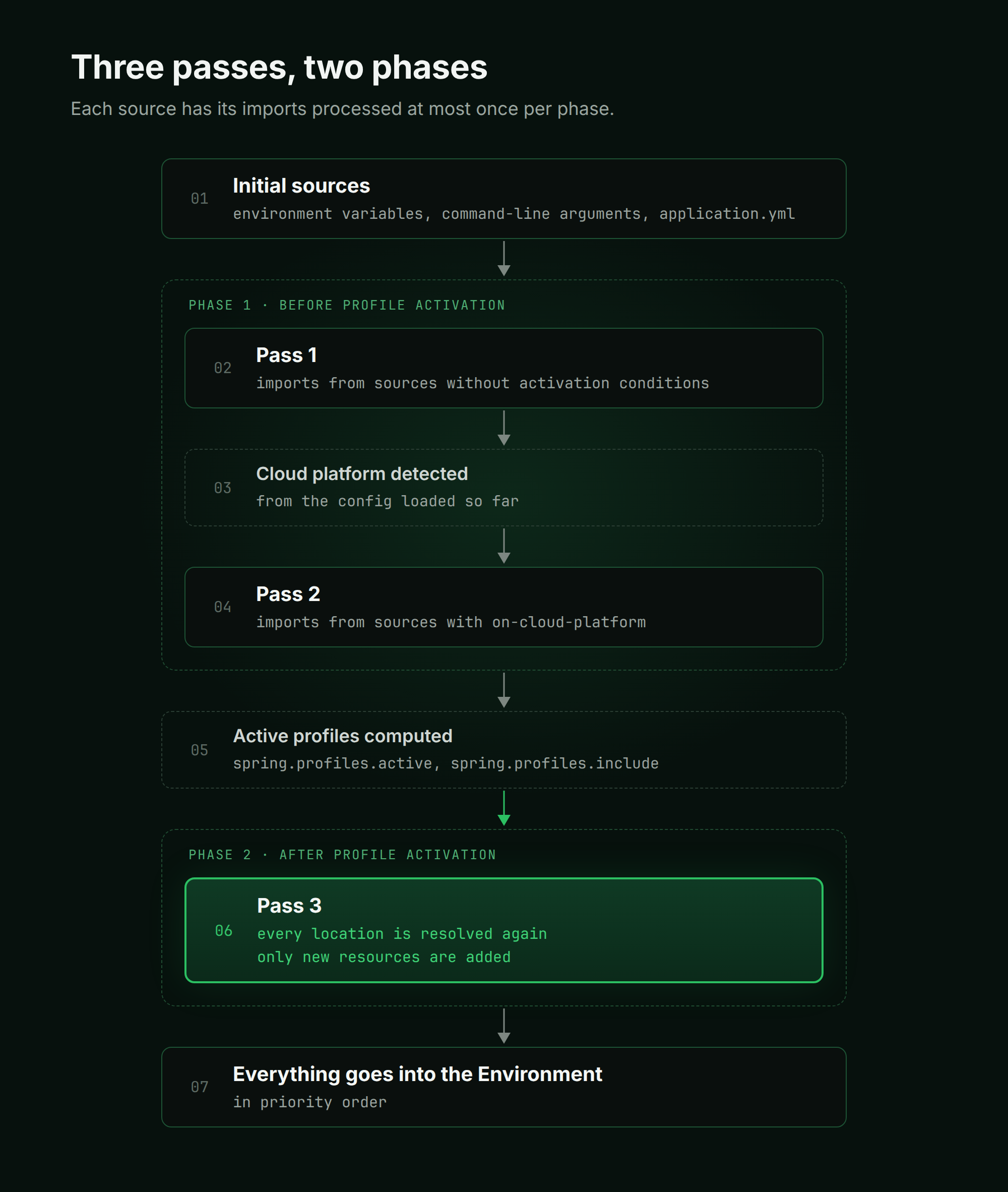
The three passes form two phases: the first two passes run before profile activation, and the third runs afterward. Within each phase, the imports of a given source are processed no more than once, so they are processed at most twice in total.
The second pass therefore does not repeat the first. It only picks up sources that became active after the cloud platform was determined. The third pass, after profile activation, finds everything that depends on profiles. For example, the same standard location with the dev profile finds not only application.yml, but also application-dev.yml.
ConfigDataImporter remembers resources that have already been loaded, so it does not load application.yml again; only new data is added to the tree. Sources with spring.config.activate.on-profile are inactive before profile activation, so their imports are processed only during the third pass.
Which Source Overrides Which?
Sources are loaded during the passes, but they are added to the Environment only at the very end. The Environment keeps its sources in a list and searches for a property from top to bottom, so the first source containing the key wins. From this point onward, a "more important" source means one that appears higher in this list.
After all three passes are complete, ConfigDataEnvironment traverses the tree and appends the loaded sources to the end of the list, below the sources that were already there. This produces the following rules:
- Environment variables, system properties, and command-line arguments take precedence over configuration files and everything connected through
spring.config.import. They were already present in theEnvironmentbefore configuration loading began, while loaded sources are placed below them. Therefore,--server.port=9090overridesserver.portfrom bothapplication.ymland Vault. - An imported source takes precedence over the source that declares the import. The import is placed in the list immediately above the file that declared it. If
application.ymlcontainsvault://, values from Vault override properties with the same names inapplication.yml. - Among multiple imports in one list, the import declared later takes precedence. With
spring.config.import: ["configserver:", "vault://"], Vault wins when both sources contain the same key. - Profile-specific sources take precedence over non-profile-specific ones.
application-dev.ymloverridesapplication.yml, andsecret/my-app/devoverridessecret/my-app.
The most important source is at the top and the least important at the bottom, with each source overriding everything below it.
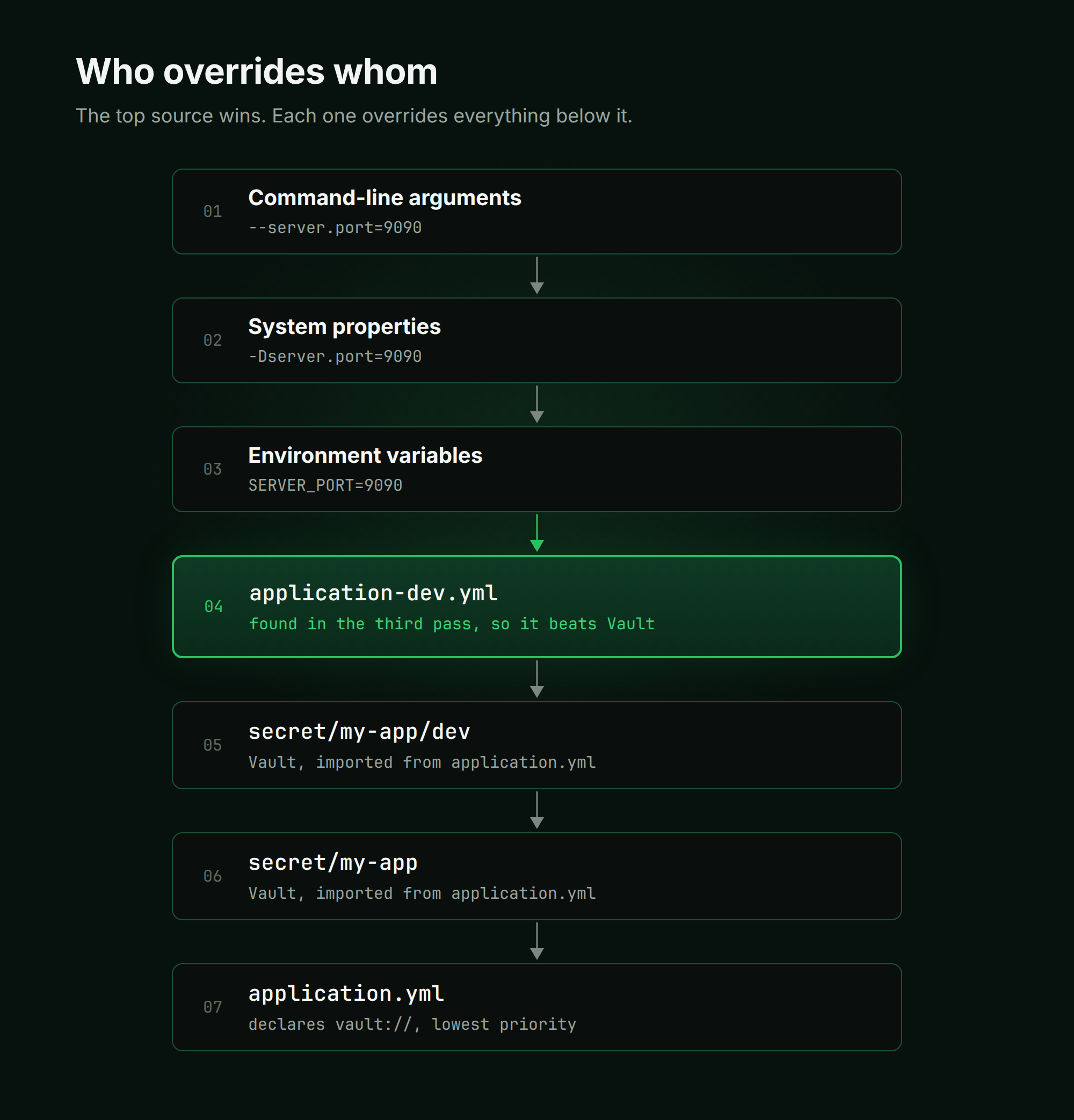
Consider the final order for an application.yml that imports optional:vault:// while the dev profile is active. application-dev.yml appears above Vault, even though Vault overrides application.yml.
The reason is that an import is placed immediately above the file in which it was declared, not above every file. Vault is declared in application.yml and sits directly above it. application-dev.yml, however, is discovered as a separate file during the third pass and therefore comes first.
This leads to a non-obvious consequence: if the same property is defined in both Vault and application-dev.yml, the value from application-dev.yml wins.
You can see the final ordering of sources in a running application at the /actuator/env endpoint, where sources are listed from highest to lowest precedence. It is even easier to inspect on the Environment page in Axelix. Properties are grouped by source, and a crown icon marks the value that is actually used when the same key is defined in multiple places.
The Resolver and the Loader
Every entry in spring.config.import goes through two steps. First, a resolver turns the location string into one or more resources. Then, a loader turns each resource into a collection of PropertySource objects.
Both are registered in META-INF/spring.factories. Spring Boot itself uses this mechanism to register ConfigTreeConfigDataLocationResolver for the configtree: prefix, SystemEnvironmentConfigDataLocationResolver for env:, and StandardConfigDataLocationResolver for ordinary files.
A resolver has two methods: resolve and resolveProfileSpecific. Only resolve is called during the first two passes. During the third pass, both methods are called and their results are combined. Vault and Kubernetes need profile information, so they do all their work in resolveProfileSpecific and run only during the third pass.
Spring Boot selects the resolver as follows:
- Resolvers are sorted according to
Orderedor@Order, andisResolvableis called on each resolver in turn. The first resolver to returntrueclaims the location; the remaining resolvers are not consulted. StandardConfigDataLocationResolveris willing to accept any location: itsisResolvablemethod always returnstrue. To prevent it from intercepting prefixes that belong to other resolvers,ConfigDataLocationResolversexplicitly moves it to the end of the list at startup, regardless of its order.
The loader in each pair is responsible for accessing the source itself. It reads a file, calls Vault or the Kubernetes API, and turns the response into a PropertySource. Spring Boot chooses a loader according to the resource type returned by the resolver. A resolver and loader for the same source therefore always operate as a pair, such as VaultConfigDataLocationResolver and VaultConfigDataLoader. If the source is unavailable or the resource does not exist, the error occurs at this step.
The optional: prefix marks a location as optional. If nothing is found there, the application still starts without an error. However, it also suppresses errors when the source is disabled in the configuration or its starter is missing, causing StandardConfigDataLocationResolver to claim the location. A typo in a prefix and a disabled source therefore look identical: nothing is loaded and no error is reported.
Where a Resolver Gets Its Settings
A resolver reads its own settings, such as the Vault address, a Kubernetes namespace, or an application name, through the Binder available from ConfigDataLocationResolverContext. This Binder sees sources that are already in the Environment and everything loaded up to that point, but it cannot see anything that will be loaded later.
This is why Vault settings can be placed in application.yml. The file is loaded before the vault:// import declared inside that same file is processed.
One Pattern, Many Implementations
There are many implementations of this contract, including implementations for Consul, Zookeeper, and AWS Parameter Store. We will look at three popular sources from Spring Cloud. They all share the same structure, and their differences lie precisely in the areas described above.
Config Client contacts the server twice. A resource created without profiles is not equal to a resource created with profiles, so ConfigDataImporter cannot deduplicate them. This is intentional: the first request returns configuration before the profiles are determined, and that configuration may influence which profiles become active.
Kubernetes performs an additional platform check. Its isResolvable returns true only inside a cluster or when spring.main.cloud-platform=kubernetes. When running locally, optional:kubernetes: is simply skipped without a message. This is a common reason for asking, "Why weren't my ConfigMaps loaded?"
| Prefix | When it runs |
|---|---|
configserver: | During the first and third passes, so the server is queried twice |
vault: | Only during the third pass |
kubernetes: | Only during the third pass, and only inside a cluster |
EnvironmentPostProcessor Before and After Config Data
The previous article established this rule: an EnvironmentPostProcessor that reads configuration must run after ConfigDataEnvironmentPostProcessor, while one that determines where configuration comes from must run before it. Now that we understand the loading process, we can see where this rule comes from.
An EnvironmentPostProcessor that runs before Config Data, meaning its getOrder() is less than ConfigDataEnvironmentPostProcessor.ORDER, writes to the Environment, and everything it adds there becomes part of the root of the ConfigDataEnvironmentContributor tree. As a result, every resolver's Binder can see it. This can be used to supply spring.cloud.vault.uri, change the Kubernetes namespace, or add spring.config.additional-location. This is how Axelix Master turns its own axelix.master.config.location property into an additional configuration location.
An EnvironmentPostProcessor that runs after Config Data, meaning its getOrder() is greater, runs after everything has been loaded, including secrets from Vault and ConfigMaps from Kubernetes. It can read and override the final values. This is how Axelix adds its endpoints to management.endpoints.web.exposure.include. However, such an EnvironmentPostProcessor can no longer affect loading itself: the resolvers have already run, and loading is complete.
Sometimes neither option works. An EnvironmentPostProcessor that runs before Config Data cannot see application.yml, because the file has not yet been loaded. If users put settings that need to be remapped into application.yml, an early EnvironmentPostProcessor cannot read them, while a late one arrives too late. This is exactly what we encountered in Axelix when moving Vault settings under our own prefix.
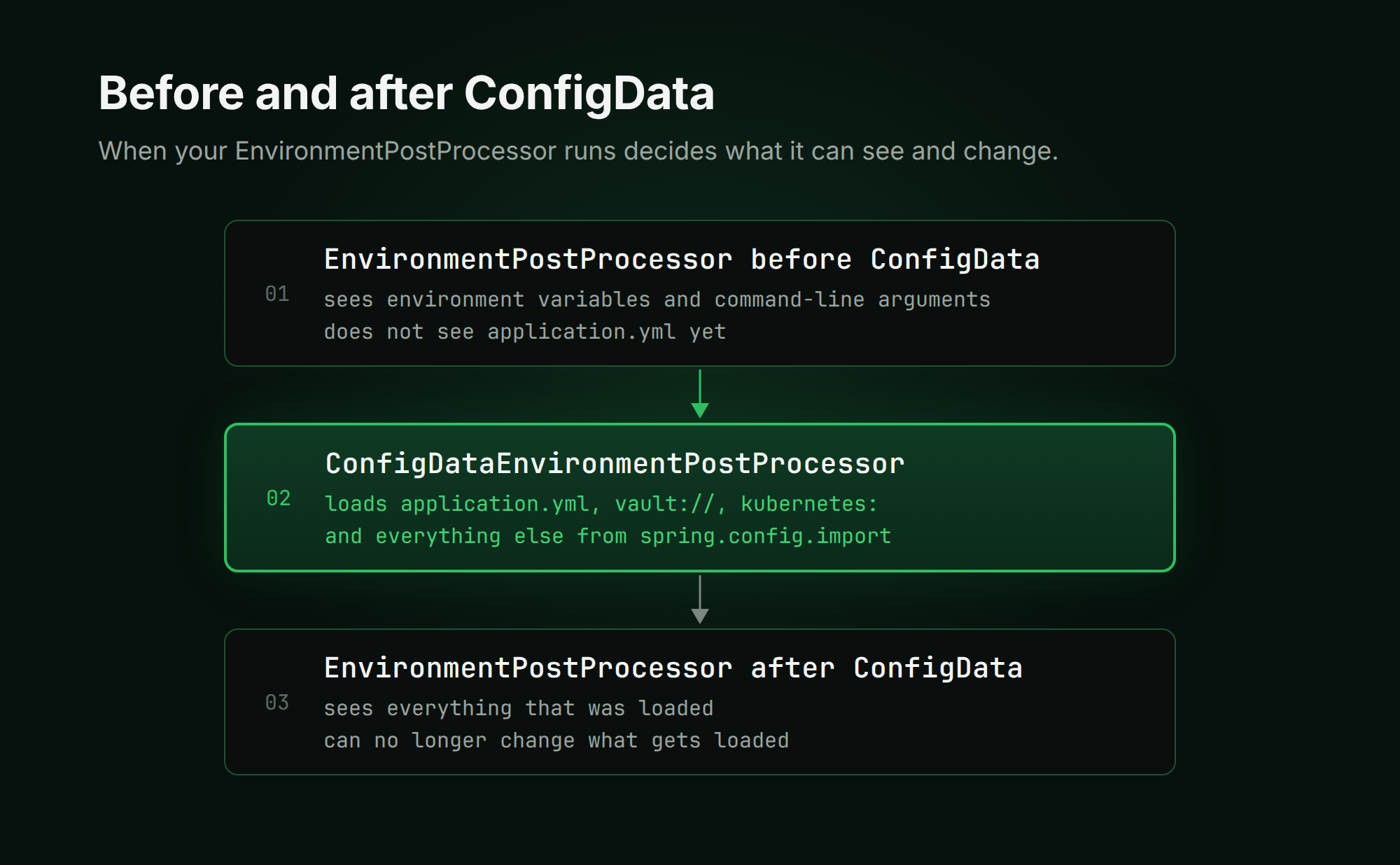
There is only one way out of this trap: intervene in Config Data processing after application.yml has been read but before the remote source is loaded. In Axelix, we did this in two ways: with placeholders and with a custom resolver.
How Axelix Connects Config Server and Vault Through Its Own Settings
In Axelix Master, all settings live under axelix.master.*, and we want external configuration to be no exception. Users configure axelix.master.external-config.spring-cloud-vault.*, not spring.cloud.vault.*.
The task is exactly the one described above: these properties are stored in application.yml, but they must be applied before the vault:// import runs.
Config Server and Placeholders
Spring Cloud Config Client has relatively few settings, so placeholders are sufficient:
spring:
  config:
    import:
      - "optional:configserver:"
      - "optional:vault://"
  cloud:
    config:
      enabled: "${axelix.master.external-config.spring-cloud-config.enabled}"
      fail-fast: true
      uri: "${axelix.master.external-config.spring-cloud-config.uri:}"
      username: "${axelix.master.external-config.spring-cloud-config.username:}"
      password: "${axelix.master.external-config.spring-cloud-config.password:}"
This works because the resolver's Binder resolves placeholders when reading the properties, and application.yml has already been loaded by then.
Notice the optional: prefix before configserver:. This is where our knowledge of isResolvable becomes useful: the Config Client resolver returns true only when spring.cloud.config.enabled is true. If the user disables Config Server, StandardConfigDataLocationResolver claims the configserver: location and cannot parse it as a file.
Without optional:, this causes a startup error. With it, the import is simply skipped. At the same time, fail-fast continues to work when the server is enabled.
Vault and a Custom Resolver
Placeholders are not suitable for Vault. VaultProperties has dozens of properties covering different authentication methods, SSL, timeouts, and more. Listing all of them manually would mean maintaining a copy of someone else's class.
Instead, we wrote a custom resolver: AxelixVaultConfigDataLocationResolver. It extends the standard Vault resolver and runs before it, so it claims the vault:// location.
In resolveProfileSpecific, it reads our settings through the Binder, adds them to the BootstrapContext as VaultProperties by calling registerIfAbsent, and then delegates to the parent implementation of resolveProfileSpecific. The parent method attempts to register its own VaultProperties instance, but that slot is already occupied, so Vault uses our settings from that point onward.
This technique relies on BootstrapContext, a small object registry that exists from the very beginning of application startup until the ApplicationContext is created. A resolver uses it to pass clients and fully assembled settings to a loader.
The registerIfAbsent method does not replace an object when an object of the same type has already been registered, so our VaultProperties instance remains in the registry.
This technique did not work for KV engine settings. The Vault resolver does not obtain VaultKeyValueBackendProperties from the BootstrapContext; instead, it binds them from the Binder under the spring.cloud.vault.kv prefix every time. Fortunately, KV has relatively few settings, so we returned to placeholders, as we did with Config Server. The spring.cloud.vault.kv.* properties in application.yml refer to axelix.master.external-config.spring-cloud-vault.kv.*.
How to See It for Yourself
Everything described above is visible in the logs. Enable TRACE for the Config Data package in application.yml, through a command-line argument, or with an environment variable:
logging:
  level:
    org.springframework.boot.context.config: TRACE
The actual logging system is not yet running at this point, so Spring Boot buffers these messages and prints them a little later, after the configured logging levels have taken effect.
Conclusion
We have examined how Spring Boot processes spring.config.import, how many passes it uses to load sources, which sources override which, and why EnvironmentPostProcessor cannot always influence loading. Keeping a few points in mind answers most questions:
- All imports are processed at startup, before the
ApplicationContextis created, over three passes — before profiles are determined and after. - A source's settings, such as a Vault address, can be stored in
application.ymlor in anything loaded before it, but not in something that will be loaded later. - Different sources run at different times. Some load immediately, while others wait for profiles.
- An import is placed immediately above the file that declares it, so a profile-specific file can take precedence over a source imported by the base file.
optional:silently skips anything that could not be loaded. If the application behaves unexpectedly, enableTRACElogging, inspect/actuator/env, or open the Environment page in Axelix.
Axelix is an open-source project. The code discussed in this article is available on GitHub, and you can always inspect how the complete implementation works.